
Electronic Payments Permissions and Workflows
Permissions
The Electronic Payments app integrates with ERPNext's existing documents and workflows. The app doesn't introduce any new roles or permission changes, but leverages the existing setup.
- Users with the Role of System Manager may create and edit the Electronic Payments Settings for a company
- Users with access to Sales Orders and Sales Invoices, or Purchase Orders and Purchase Invoices will see an "Electronic Payments" button on those documents, enabling them to make a payment on behalf of a customer or to a supplier
- Users with access to Customers or Suppliers are able to see that party's associated Portal Payment Methods on the Electronic Payments tab
- Users with the Role of Customer or Supplier are able to add payment methods via their portal access. Customers may apply those payment methods on outstanding Sales Orders or Sales Invoices
Workflows
As noted in the Configuration and Settings page, there are two distinct methods for posting an electronic payment - using a Journal Entry with a Clearing Account, or using a Payment Entry.
The major difference between the two options is when the electronic payment reflects against the deposit account (for accepting payments) or the withdrawal account (when sending payments). With a Journal Entry and clearing account, when the electronic payment successfully clears, the balance amount moves off the Accounts Receivable or Accounts Payable account associated with the party and onto the clearing account. Only after transactions settle would the user make the entries to offset the cash transfers to/from the provider against the clearing account.
With a Payment Entry, when the electronic payment successfully clears, the transaction immediately reflects against the deposit or withdrawal account - there is no intermediate step with a clearing account.
Journal Entry with Clearing Account
When a payment successfully clears with the given provider, the system saves and submits a new Journal Entry for the individual transaction.
Accepting Payments
The balance moves off of the Accounts Receivable account associated with the party. The paid amount (balance net any discounts plus provider fees, if configured) is debited against the clearing account. Any fees the customer pays are credited against the fee account and any discounts (per terms in the order or invoice's payment schedule) are debited against the payment discount account. The clearing account, fee account, and payment discount account are specified in the Electronic Payment Settings document. The app automatically integrates with the payment schedule and updates it when a payment successfully clears.
The following table illustrates the debits and credits in a Journal Entry for an accepted electronic payment for a Sales Invoice made by a Customer. The Customer took advantage of a payment term discount if they paid early, and the payment method they applied is configured with the provider fees.
| Account | Party | Party Type | Debit | Credit |
|---|---|---|---|---|
| 1310 - Accounts Receivable - CFC | Grus Goodies | Customer | $64.65 | |
| 1320 - Electronic Payments Receivable - CFC | Grus Goodies | Customer | $64.94 | |
| 5223 - Electronic Payments Provider Fees - CFC | $1.58 | |||
| 4110 - Sales - CFC | $1.29 |
When the provider settles transactions and transfers cash into the deposit account (specified in the Electronic Payment Settings document), the user can reconcile them against the clearing account.
Sending Payments
The balance moves off of the Accounts Payable account associated with the party. The paid amount (balance net any discounts plus provider fees, if configured) is credited against the clearing account. Any fees the company pays are debited against the fee account and any discounts (per terms in the order or invoice's payment schedule) are credited against the payment discount account. The clearing account, fee account, and payment discount account are specified in the Electronic Payment Settings document.
The following table illustrates the debits and credits in a Journal Entry for sending an electronic payment on a Purchase Invoice to a Supplier. There is a debit to Accounts Payable for the invoice total, a credit to the clearing account (invoice total less a valid 2% discount of $4.00 for paying early), and a credit to the payment discount account. The payment option the company selected to fund the transfer has a $3.00 fee associated with it, so there's a debit to the fee account.
| Account | Party | Party Type | Debit | Credit |
|---|---|---|---|---|
| 2110 - Accounts Payable - CFC | Exceptional Grid | Supplier | $200.00 | |
| 2130 - Electronic Payments Payable - CFC | Exceptional Grid | Supplier | $199.00 | |
| 5221 - Miscellaneous Expenses - CFC | $4.00 | |||
| 5223 - Electronic Payments Provider Fees - CFC | $3.00 |
When the provider settles transactions and transfers cash out of the withdrawal account (specified in the Electronic Payment Settings document), the user can reconcile them against the clearing account.
Payment Entry
When a payment successfully clears with the given provider, the system saves and submits a new Payment Entry for the individual transaction.
Accepting Payments
The References table logs the Order or Invoice with the balance amount. Any fees paid by the customer show in the Advance Taxes and Charges table and are associated with the fee account. If the reference document had a valid discount in its payment schedule, the discount amount shows in the Payment Deduction of Loss table and is associated with the payment discount account. The deposit account is used to receive the payment. A record of the transaction (via the provider's transaction ID) is stored in the Reference No. field. The deposit account, fee account, and payment discount account are specified in the Electronic Payment Settings document
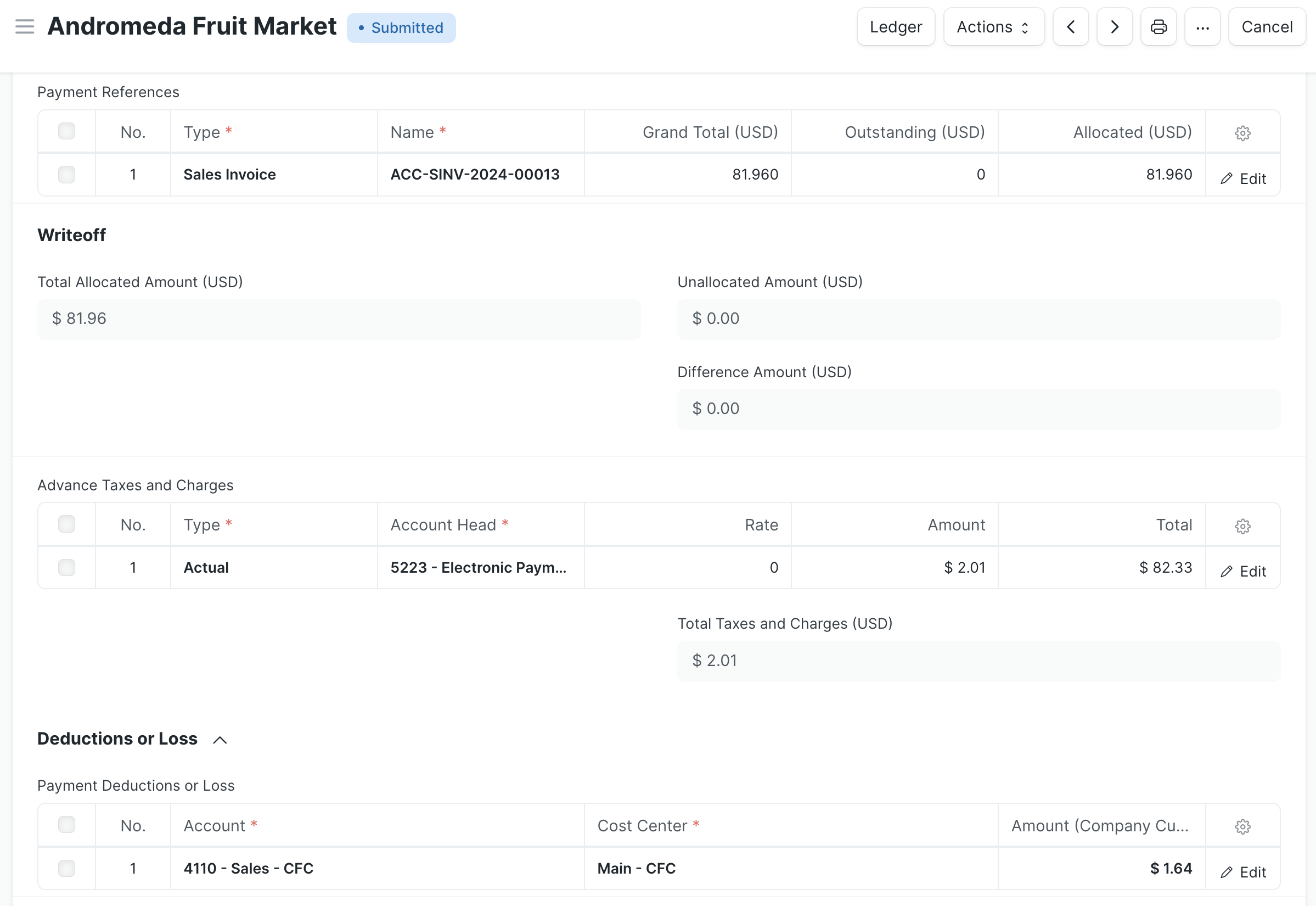
| Account | Party | Party Type | Debit | Credit |
|---|---|---|---|---|
| 1310 - Accounts Receivable - CFC | Andromeda Fruit Market | Customer | $81.96 | |
| 1201 - Primary Checking - CFC | $82.33 | |||
| 4110 - Sales - CFC | $1.64 | |||
| 5223 - Electronic Payments Provider Fees - CFC | $2.01 |
Sending Payments
The References table logs the Order or Invoice with the balance amount. Any provider fees paid by the company show in the Advance Taxes and Charges table and are associated with the fee account. If the reference document had a valid discount in its payment schedule, the discount amount shows in the Payment Deduction of Loss table and is associated with the payment discount account. The withdrawal account is used to clear the payment. A record of the transaction (via the provider's transaction ID) is stored in the Reference No. field. The withdrawal account, fee account, and payment discount account are specified in the Electronic Payment Settings document.
In the example below, the company pays a Supplier's Purchase Invoice totaling $200 early, therefore qualifying for a 2% discount of $4.00. The payment option the company selected to fund the transfer has a $3.00 fee associated with it.
| Account | Party | Party Type | Debit | Credit |
|---|---|---|---|---|
| 2110 - Accounts Payable - CFC | Exceptional Grid | Supplier | $200.00 | |
| 1201 - Primary Checking - CFC | $199.00 | |||
| 5221 - Miscellaneous Expenses - CFC | $4.00 | |||
| 5223 - Electronic Payments Provider Fees - CFC | $3.00 |