
Undeclared UOM
ERPNext lets you post stock transactions in a UOM that is not listed on the Item's UOM Conversion Detail table (the Item child table named UOMs). When that happens, get_conversion_factor may fall back to a global conversion or default the factor to 1 — so quantities can be recorded as if 1 Kilometer equals 1 Pound. You can restrict UOM selection in the transaction UI by enabling Stock Settings → Allow UOM with conversion rate defined in Item; that setting is site-wide and applies to all Companies and Items.
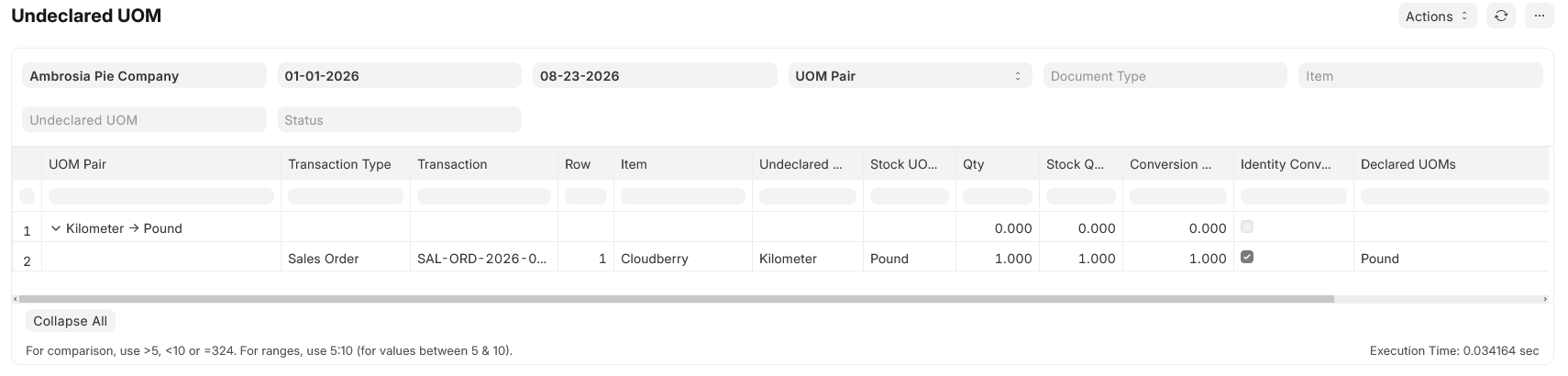
The Undeclared UOM report finds submitted (and optionally draft or cancelled) transaction lines whose UOM is missing from that Item's conversion table. It is a discovery tool only: it does not block saves, amend documents, or write conversion rows for you.
What counts as a finding
A line is included when all of the following are true:
- The line has an Item and a UOM.
- That UOM is not a row on the Item's UOM Conversion Detail table (
parent= item code,uom= line UOM). - The parent document matches the report filters (company, date range, status, and optional document type / item / UOM filters).
This is the same membership test ERPNext uses when Stock Settings → Allow UOM with conversion rate defined in Item restricts the UOM picker in transactions. The report applies that test to existing lines across many document types.
The report does not flag:
- Lines where the UOM is on the conversion table but the stored conversion factor differs from the item master.
- Fallbacks through the global UOM Conversion Factor doctype (only the item table is consulted).
- BOM Item, Work Order, or Item Price rows (out of scope for this report).
Variant items are checked against the variant's own conversion table, not the template item.
Where to find it
Open Undeclared UOM from the Awesome Bar or under Inventory Tools reports after bench migrate installs the report fixture.
Filters
| Filter | Purpose |
|---|---|
| Company | Required. Limits results to one company. |
| From Date / To Date | Required. Uses the parent document's transaction or posting date (Pick List uses creation date). |
| Group By | UOM Pair (default) or Document. Controls tree grouping. |
| Document Type | Optional. Restricts which parent doctypes are scanned; leave blank for all. |
| Item | Optional. Only lines for this item. |
| Undeclared UOM | Optional. Only lines using this UOM. |
| Status | Draft, Submitted, and/or Cancelled. Default is Submitted. |
Report output
Results are shown as a tree: a summary row (indent 0) with detail lines beneath it (indent 1).
Group by UOM Pair
Summary rows are labeled {undeclared_uom} → {stock_uom} (for example Kilometer → Pound). Line Count is the number of transaction lines in that group; Identity Count is how many of those lines have Identity Conversion set.
Group by Document
Summary rows are labeled {Transaction Type} {name} (for example Sales Order SAL-ORD-2026-00001). All undeclared lines on that document appear as children.
Line columns
| Column | Meaning |
|---|---|
| Transaction Type / Transaction | Parent doctype and document name (link). |
| Row | Child table row number. |
| Item | Item code on the line. |
| Undeclared UOM | UOM on the line that is not on the item's conversion table. |
| Stock UOM | Item stock UOM on the line (or from the Item master for Packed Item rows). |
| Qty / Stock Qty | Quantities as stored on the line (transfer_qty for Stock Entry Detail). |
| Conversion Factor | Factor stored on the line. |
| Identity Conversion | Checked when conversion factor is 1 and undeclared UOM ≠ stock UOM — the unsafe 1:1 case. |
| Declared UOMs | Comma-separated UOMs currently on the item's conversion table. |
Documents scanned
Sales: Quotation, Sales Order, Delivery Note, Sales Invoice, POS Invoice (including Packed Item children where applicable).
Buying: Request for Quotation, Supplier Quotation, Purchase Order, Purchase Receipt, Purchase Invoice.
Stock: Material Request, Stock Entry, Pick List.
Subcontracting: Subcontracting Order, Subcontracting Receipt (lines use stock UOM only; findings are uncommon unless the item table is incomplete).
Fixing findings
Each row points at a specific document line. Typical cleanup paths:
- Correct the transaction — amend or cancel/re-enter the line with a declared UOM and the right conversion factor.
- Update the item master — add the UOM and conversion factor to the Item UOMs table if that UOM is genuinely valid for the item (then re-run the report to confirm the line drops off).
There are no repair actions on the report itself.
Prevention
To stop new lines from using undeclared UOMs in the UI, enable Stock Settings → Allow UOM with conversion rate defined in Item. That limits the UOM link field to rows on the item's conversion table but does not validate on the server for most transaction types — so the Undeclared UOM report remains useful for auditing historical data and anything entered before the setting was turned on.
Inventory Tools previously exposed a similar Enforce UOMs setting; that toggle is deprecated in favor of ERPNext's Stock Settings field.