
Deferred Revenue and Expenses in ERPNext
Deferred Revenue and Deferred Expenses are accounts used in accrual accounting to reconcile timing differences that arise when a transaction enters the general ledger outside the period it is actually incurred.
Accrual-based accounting principles guide a company to recognize revenue when it provides the good or service to the customer, and recognize an expense when it consumes or utilizes it. If the entry for a transaction doesn't align with the right period, accountants need to make an adjusting entry to correct for the mismatch. The adjustment will involve a balance sheet account. This may be an asset or a liability, depending on the nature of the transaction. The following are all examples where adjusting entries are necessary:
- Unearned (or deferred) revenue: the company has invoiced or been paid by a customer, but hasn't provided a good or service as of period end
- Un-billed (or accrued) revenue: the company has provided a good or service, but hasn't invoiced the customer as of period end
- Prepaid (or deferred) expenses: the company has paid for a good, service, etc., but hasn't consumed it as of period end
- Accrued expenses: the company has incurred an expense (such as employee wages), but hasn't paid it as of period end
This article covers the two deferred situations above, and how to handle them in ERPNext.
Deferred Revenue
Deferred Revenue is a liability account that reflects a company's "unearned" revenue. This happens when the company has billed or received payment from a customer, but hasn't provided the good or service before the accounting period ends.
An example is a company that sells an annual repair service contract for $1,200 that a customer pays for in full up front. In this case, the accountant would record the amount of the sale in the Deferred Revenue liability account, then reduce that account and recognize revenue over the course of the next twelve months as the company fulfills its obligation to the customer. The flow of journal entries would be as follows, assuming the company closes its books on a semi-annual basis:
- A customer purchases the service contract on January 1st. The company debits Cash $1,200 and credits the Deferred Revenue liability account $1,200
- On June 30th, the company recognizes (credits) Revenue $600 for the contract for the prior six months, and debits $600 from Deferred Revenue (the account balance for this contract would then be $600)
- At the end of the year, the company credits Revenue the remaining $600 for that contract, and debits $600 from Deferred Revenue (bringing the account balance for this contract to $0)
| Date | Account | Party | Stock Ledger | Debit | Credit |
|---|---|---|---|---|---|
| Jan-01 | Cash | $1,200.00 | |||
| Jan-01 | Deferred Revenue | $1,200.00 | |||
| Jun-30 | Revenue | $600.00 | |||
| Jun-30 | Deferred Revenue | $600.00 | |||
| Dec-31 | Revenue | $600.00 | |||
| Dec-31 | Deferred Revenue | $600.00 |
Handling Deferred Revenue in ERPNext
ERPNext makes handling deferred revenue adjustments straightforward once a few settings are in place. The system is set to automatically handle deferred accounting and the user can fine-tune the accounting behavior in the Deferred Accounting Settings section under Invoice and Billing in the Accounts Settings.
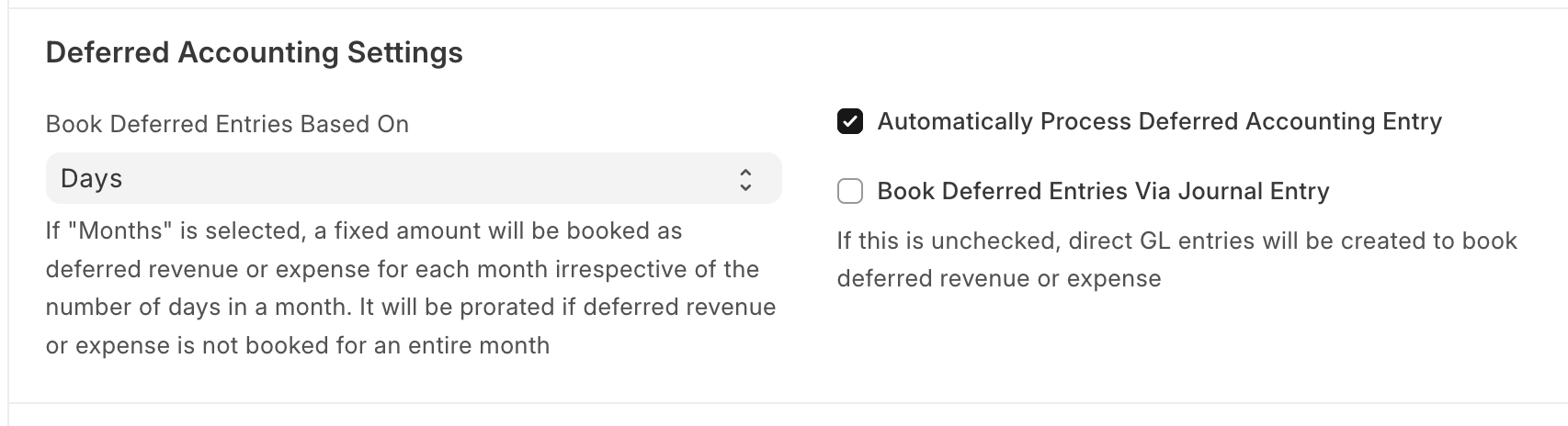
The box for "Automatically Process Deferred Accounting Entry" is checked by default, which enables ERPNext to find deferred revenue or expense items in invoices and process the accounting for them at the month's end. A company can deselect this option if it wants to handle deferred accounting adjustments manually via a Process Deferred Accounting document.
Next, there's a choice for how the amount is determined for the period in the "Book Deferred Entries Based On" dropdown. ERPNext calculates deferred accounting entries on a monthly basis:
- "Days" prorates the monthly amount depending on the number of days per month. An $1,800 annual subscription would show $152.88 of revenue for January (31 days) and $138.08 for February (28 days)
- "Months" allocates the same amount for each month. The $1,800 annual subscription would show $150 revenue each month
For both options, ERPNext prorates the first month's revenue amount depending on when the service starts in the month. For example, if the annual subscription service starts on April 16, the first month's deferred revenue adjustment would reflect 15 days, or half the month.
The final option is whether to "Book Deferred Entries via Journal Entry". This box is unchecked by default, and the system automatically creates direct General Ledger entries against a qualifying invoice (one that contains an item with "Deferred Revenue" or "Deferred Expense" enabled). If a company selects this option, ERPNext books the deferred amount with a Journal Entry instead.
After the Accounts Settings are in place, a company needs to create a liability account in its Chart of Accounts to hold Deferred Revenue before it is recognized as income.
The next step is to enable Deferred Revenue in the Item Master for items where this is relevant. ERPNext uses this configured information to populate the fields associated with deferred revenue for the item when it's added to a Sales Invoice.
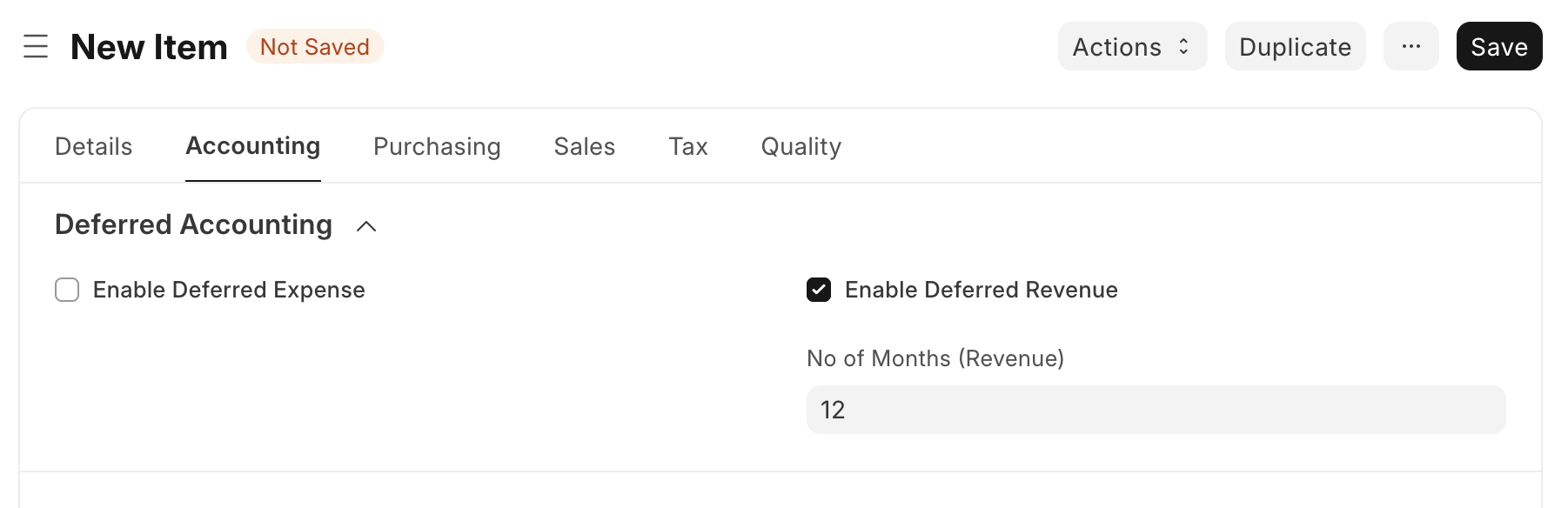
In the Accounting section, there's a checkbox to "Enable Deferred Revenue". Once checked, the section expands to show an optional "No of Months" field to input the duration over which to book Deferred Revenue in number of months. ERPNext uses this field to calculate the "Service End Date" for the Item when it's included in an Invoice. If "No of Months" is left blank, the end date defaults to the Invoice posting date and can be manually changed as needed.
When a Sales Invoice contains any items with Deferred Revenue enabled, ERPNext credits the Deferred Revenue liability instead of booking income. In the Sales Invoice, the user can adjust the details for any rows in the Items table with a Deferred Revenue-enabled Item by clicking the Edit icon.
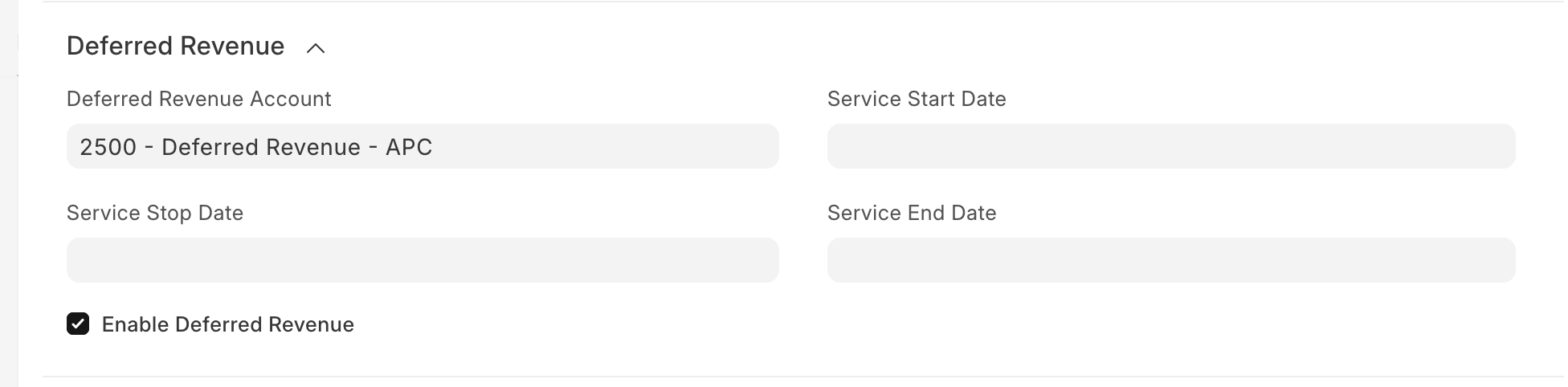
The "Deferred Revenue" section of the dialog holds a few fields to fill in or confirm the options. If the Item Master is configured as Deferred Revenue, then ERPNext automatically checks the "Enable Deferred Revenue" box. ERPNext uses the Invoice's posting date for the "Service Start Date", then if the Item Master has input for the number of months, ERPNext populates the "Service End Date" field based on the data. The user can enter the appropriate account in the "Deferred Revenue Account" field.
Note that the system will prorate the first month if the start date is any date other than the first of the month, but the field may be edited as appropriate. There's an optional "Service Stop Date" field as well. The date must be between the "Service Start Date" and "Service End Date". If this exists, ERPNext will debit the remaining amount left in the Deferred Revenue liability (for that item) and credit revenue in the month containing the "Service Stop Date".
Over time, ERPNext automatically generates the necessary monthly entries to recognize revenue and debit the Deferred Revenue account. Under the hood, ERPNext triggers the deferred accounting calculations at month's end via the monthly long queue. It finds invoices with deferred revenue items where the service dates are still active within that month, and creates the necessary accounting entries.
Deferred Expenses
The Deferred Expenses account is an asset that reflects a company's prepaid expenses, and may be named as such. It's used to record the amount of an expense a company has paid for but not yet utilized in the current accounting period. Examples can include prepaid rent or a subscription to an industry newsletter.
The accounting pattern is similar to the Deferred Revenue adjustments. For example, a company decides to use an online education service to train employees in a new technology. The value is $50 per month but due in full at the beginning of the annual subscription. The flow of journal entries would be as follows, assuming the company closes its books on a semi-annual basis:
- The company purchases the annual subscription January 1st, credits Cash $600, and debits the Deferred Expense asset account $600
- On June 30th, the company recognizes (debits) Expenses $300 to reflect utilizing the training service for six months, and credits $300 from Deferred Expenses (the account balance for this transaction would then be $300)
- At the end of the year, the company debits Expenses the remaining $300 for the training, and credits $300 from Deferred Expenses (bringing the balance to $0 for this subscription)
| Date | Account | Party | Stock Ledger | Debit | Credit |
|---|---|---|---|---|---|
| Jan-01 | Cash | $600.00 | |||
| Jan-01 | Deferred Expenses | $600.00 | |||
| Jun-30 | Expenses | $300.00 | |||
| Jun-30 | Deferred Expenses | $300.00 | |||
| Dec-31 | Expenses | $300.00 | |||
| Dec-31 | Deferred Expenses | $300.00 |
Handling Deferred Expenses in ERPNext
Initial setup for Deferred Expenses is the same as for Deferred Revenue - refer to the above section for details. A company needs to create an asset account in its Chart of Accounts to hold Deferred Expenses before they're recognized as expenses.
The next step is to enable Deferred Expense in the Item Master for items where this is relevant. ERPNext uses this configured information to populate the fields associated with deferred expense for the Item when it's added to a Purchase Invoice.
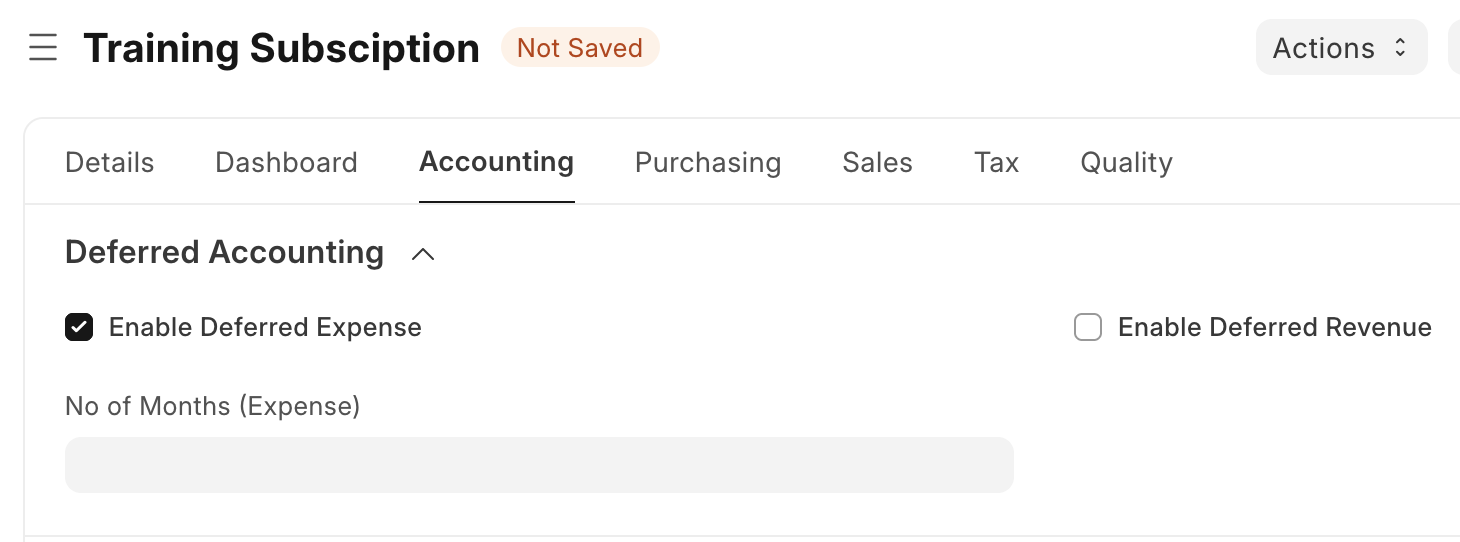
In the Accounting section, there's a checkbox to "Enable Deferred Expense". Once checked, the section expands to show an optional "No of Months" field to input the duration over which to book Deferred Expense in number of months. ERPNext uses this field to calculate the "Service End Date" for the Item when it's included in an Invoice. If "No of Months" is left blank, the end date defaults to the Invoice posting date and can be manually changed as needed.
When a Purchase Invoice contains any items with Deferred Expense enabled, ERPNext debits the specified Deferred Expense asset instead of booking an expense.
When a Sales Invoice contains any items with Deferred Revenue enabled, ERPNext credits the Deferred Revenue liability instead of booking income. In the Sales Invoice, the user can adjust the details for any rows in the Items table with a Deferred Revenue-enabled Item by clicking the Edit icon.
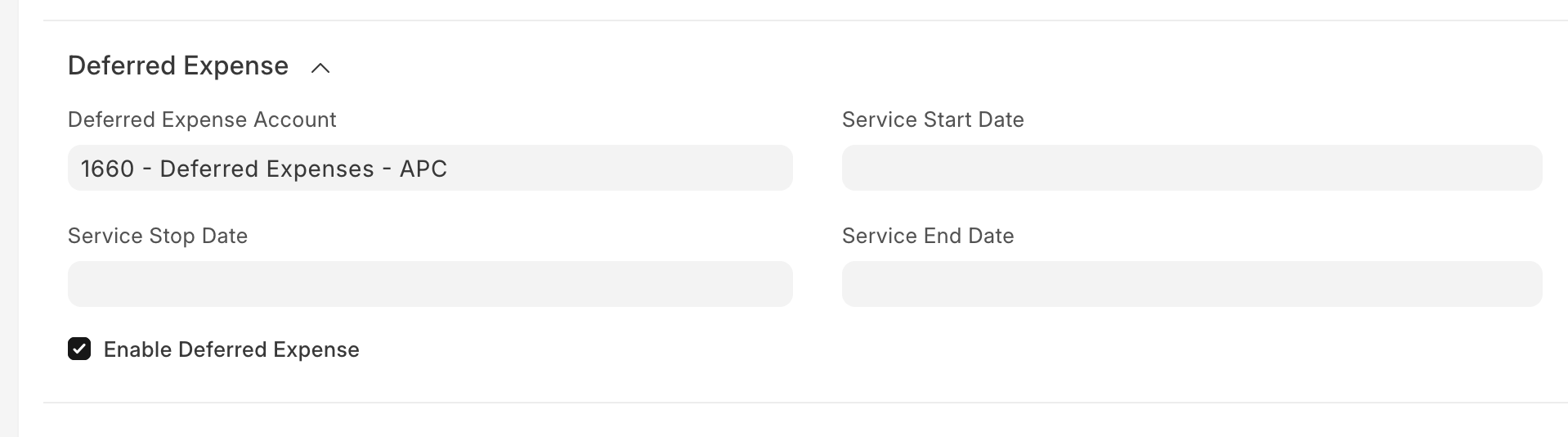
The "Deferred Expense" section of the dialog holds a few fields to fill in or confirm the options. If the Item Master is configured as Deferred Expense, then ERPNext automatically checks the "Enable Deferred Expense" box. ERPNext uses the Invoice's posting date for the "Service Start Date", then if the Item Master has input for the number of months, ERPNext populates the "Service End Date" field based on the data. The user can enter the appropriate account in the "Deferred Expense Account" field.
Note that the system will prorate the first month if the start date is any date other than the first of the month, but the field may be edited as appropriate. There's an optional "Service Stop Date" field as well. The date must be between the "Service Start Date" and "Service End Date". If this exists, ERPNext will credit the remaining amount left in the Deferred Expense asset (for that item) and debit expenses in the month containing the "Service Stop Date".
As with deferred revenue, over time, ERPNext automatically generates the necessary monthly entries to recognize expenses and credit the Deferred Expense account.
If the above settings and configurations don't fit a company's accounting needs, it can either manually create a new Process Deferred Accounting document or customize the software's built-in functionality. In general, ERPNext provides solid support for deferred accounting out of the box.
References: